derdjango
Becks Apfel (Emstaler Champagner)
- Registriert
- 23.01.14
- Beiträge
- 333
Da gibst Du letztendlich doch nach und updatest vorher noch den Mac auf macOS 26 und dann das... 
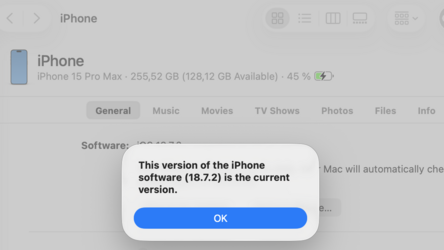
Edit: Falls jemand auch das Problem hat, über den Recovery Mode ging es.
Edit: Falls jemand auch das Problem hat, über den Recovery Mode ging es.
- Connect your iPhone to your computer.
- Press and quickly release the Volume up button.
- Press and quickly release the Volume down button.
- Press and hold the Power button until you see the screen displaying a laptop and a cable.
- Finder (or iTunes) will display a message saying it needs to update or restore the iPhone.
- Click Update. Your computer will download the update and install it on your iPhone.
- If the iOS 26 installation goes through without issues, your iPhone should reboot normally.
Zuletzt bearbeitet: