@Macbeatnik, hier...
EtreCheck version: 3.0.6 (315)
Report generated 2016-10-30 14:42:45
Download EtreCheck from
https://etrecheck.com
Runtime 1:40
Performance: Excellent
Click the [Support] links for help with non-Apple products.
Click the [Details] links for more information about that line.
Problem: Apps are crashing
Hardware Information: ⓘ
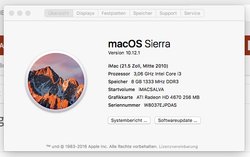
iMac (21.5-inch, Mid 2010)
[Technical Specifications] - [User Guide] - [Warranty & Service]
iMac - model: iMac11,2
1 3,06 GHz Intel Core i3 CPU: 2-core
8 GB RAM Upgradeable - [Instructions]
BANK 0/DIMM0
2 GB DDR3 1333 MHz ok
BANK 1/DIMM0
2 GB DDR3 1333 MHz ok
BANK 0/DIMM1
2 GB DDR3 1333 MHz ok
BANK 1/DIMM1
2 GB DDR3 1333 MHz ok
Bluetooth: Old - Handoff/Airdrop2 not supported
Wireless: en1: 802.11 a/b/g/n
Video Information: ⓘ
ATI Radeon HD 4670 - VRAM: 256 MB
iMac 1920 x 1080
System Software: ⓘ
macOS Sierra 10.12.1 (16B2555) - Time since boot: less than an hour
Disk Information: ⓘ
ST3500418AS disk0 : (500,11 GB) (Rotational)
EFI (disk0s1) <not mounted> : 210 MB
iMAC[redacted]VA (disk0s2) / [Startup]: 499.25 GB (85.32 GB free)
Recovery HD (disk0s3) <not mounted> [Recovery]: 650 MB
OPTIARC DVD RW AD-5680H ()
USB Information: ⓘ
Apple Card Reader
Apple Inc. BRCM2046 Hub
Apple Inc. Bluetooth USB Host Controller
Seagate BUP Slim SL
Apple Computer, Inc. IR Receiver
Apple Inc. Built-in iSight
Gatekeeper: ⓘ
Mac App Store and identified developers
System Launch Agents: ⓘ
[not loaded] 8 Apple tasks
[loaded] 171 Apple tasks
[running] 92 Apple tasks
System Launch Daemons: ⓘ
[not loaded] 41 Apple tasks
[loaded] 166 Apple tasks
[running] 96 Apple tasks
Launch Agents: ⓘ
[running] com.amazon.sendtokindle.launcher.plist (2015-11-13) [Support]
Launch Daemons: ⓘ
[loaded] com.adobe.fpsaud.plist (2016-10-23) [Support]
[loaded] com.microsoft.autoupdate.helpertool.plist (2016-08-03) [Support]
[loaded] com.microsoft.office.licensing.helper.plist (2015-06-04) [Support]
[loaded] com.microsoft.office.licensingV2.helper.plist (2015-11-05) [Support]
User Login Items: ⓘ
iTunesHelper Programm (/Applications/iTunes.app/Contents/MacOS/iTunesHelper.app)
Internet Plug-ins: ⓘ
Silverlight: 5.1.50428.0 - SDK 10.6 (2016-07-09) [Support]
FlashPlayer-10.6: 23.0.0.205 - SDK 10.9 (2016-10-27) [Support]
QuickTime Plugin: 7.7.3 (2016-10-25)
Flash Player: 23.0.0.205 - SDK 10.9 (2016-10-27) [Support]
SharePointBrowserPlugin: 14.6.9 - SDK 10.6 (2016-10-18) [Support]
Safari Extensions: ⓘ
AdBlock - BetaFish, Inc. -
https://getadblock.com (2015-10-09)
Evernote Web Clipper - Evernote Corp. -
http://evernote.com (2016-10-22)
3rd Party Preference Panes: ⓘ
Flash Player (2016-10-23) [Support]
Time Machine: ⓘ
Skip System Files: NO
Mobile backups: OFF
Auto backup: YES
Volumes being backed up:
iMACSALVA: Disk size: 499.25 GB Disk used: 413.93 GB
Destinations:
EXTERNE TIMEMACHINE MACS UND MACBOOK [Local]
Total size: 2.00 TB
Total number of backups: 43
Oldest backup: 16.11.15, 00:18
Last backup: 30.10.16, 11:53
Size of backup disk: Excellent
Backup size 2.00 TB > (Disk size 499.25 GB X 3)
Top Processes by CPU: ⓘ
3% WindowServer
1% fontd
0% com.apple.AmbientDisplayAgent
0% loginwindow
0% kernel_task
Top Processes by Memory: ⓘ
671 MB kernel_task
369 MB mdworker(17)
352 MB OneDrive(2)
197 MB assistantd
180 MB assistant_service
Virtual Memory Information: ⓘ
3.99 GB Free RAM
4.01 GB Used RAM (2.00 GB Cached)
0 B Swap Used
Diagnostics Information: ⓘ
Oct 30, 2016, 02:37:17 PM /Library/Logs/DiagnosticReports/OneDrive_2016-10-30-143717_[redacted].cpu_resource.diag [Details]
/Applications/OneDrive.app/Contents/MacOS/OneDrive
Oct 30, 2016, 02:31:52 PM Self test - passed
Oct 30, 2016, 09:34:38 AM /Library/Logs/DiagnosticReports/OneDrive_2016-10-30-093438_[redacted].cpu_resource.diag [Details]
Oct 29, 2016, 07:48:40 PM /Library/Logs/DiagnosticReports/OneDrive_2016-10-29-194840_[redacted].cpu_resource.diag [Details]
Oct 29, 2016, 11:45:53 AM /Library/Logs/DiagnosticReports/firefox_2016-10-29-114553_[redacted].cpu_resource.diag [Details]
/Applications/Firefox.app/Contents/MacOS/firefox
Oct 29, 2016, 07:18:44 AM /Library/Logs/DiagnosticReports/OneDrive_2016-10-29-071844_[redacted].cpu_resource.diag [Details]
Oct 28, 2016, 03:40:12 PM /Library/Logs/DiagnosticReports/firefox_2016-10-28-154012_[redacted].cpu_resource.diag [Details]
Oct 28, 2016, 02:41:07 PM /Library/Logs/DiagnosticReports/OneDrive_2016-10-28-144107_[redacted].cpu_resource.diag [Details]
Oct 28, 2016, 08:11:05 AM /Library/Logs/DiagnosticReports/firefox_2016-10-28-081105_[redacted].cpu_resource.diag [Details]
Oct 28, 2016, 07:16:22 AM /Library/Logs/DiagnosticReports/OneDrive_2016-10-28-071622_[redacted].cpu_resource.diag [Details]