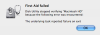
Backup brennen --> Fehler -43 <unable to get path>???

Randfee

Pomme d'or
Registriert
28.12.04
Beiträge
3.113
Hallo!

wollte seit einiger Zeit nochmal meinen Library Folder brennen und habe jetzt schon 2 DVDs verhunzt.

1. Den gesamten Library Folder will er schon garnichct anfangen zu brennen, da er gewissen Dateien im Preferences Folder scheinbar nicht finden kann (Adobe irgendwas). Was soll das?

2. Wenn ich alles außer dem preferences Folder brennen will, bringt er diesen Fehler 43, auch lustig.. Wieso kann ich das nicht brennen?

Andreas
 

Anhänge

  • Picture 1.png
    Picture 1.png
    18,2 KB · Aufrufe: 169
Randfee schrieb:
2. Wenn ich alles außer dem preferences Folder brennen will, bringt er diesen Fehler 43, auch lustig.. Wieso kann ich das nicht brennen?

Möglicherweise nur ein zielloser Symlink.
Auf jeden Fall erstmal Dateisystem prüfen.
 
Hallo,

hm, -43 = File or Directory not found. Aber ich würde eher vermuten tote Aliase sind im Spiel...

mfg pi26
 
Wenn du das verbraten von CD/DVDs vermeiden willst, schreibe doch ein Image und brenne dann dieses.
 
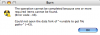
aha, per disk utility das file system geprueft. Der "Repair Disk" Button unter Verify ist aber grau und unanwaehlbar, eine idee???

Meldung:

Verifying volume “Macintosh HD“
Checking HFS Plus volume.
Checking Extents Overflow file.
Checking Catalog file.
Illegal name
Illegal name
Checking multi-linked files.
g Catalog hierarchy.",0)
Checking Extended Attributes file.
Checking volume bitmap.
Volume Bit Map needs minor repair
Checking volume information.
id volume free block count",0)
(It should be 1909724 instead of 1906545)
The volume Macintosh HD needs to be repaired.

Error: The underlying task reported failure on exit


1 HFS volume checked
Volume needs repair
 

Anhänge

  • Picture 2.png
    Picture 2.png
    25,4 KB · Aufrufe: 162
startvolume kann so nicht repariert werden. Mit System-CD oder andere Startvolume starten...

mfg pi26
 
Hm, verify yes. repair no?

With Mac OS X 10.4.3 or later, Disk Utility can verify your computer's startup disk (volume) without requiring you to start up from another volume. This feature is called "Live Verification." If Disk Utility discovers any issues that require a repair, you will need to start up from your Mac OS X Tiger DVD or CD and use Disk Utility on that disc to make repairs. (You can't repair your startup volume while your computer is started up from it.)

mfg pi26 :-)